
Buzzer Game Master
|
Buzzer Game Master is a desktop application running on Windows 11. It is a tool to implement the concept of 'Flipped Classroom'. It allows teachers to run Buzzer Game TV Shows with students in a classroom. |
 |
PaperBuilder
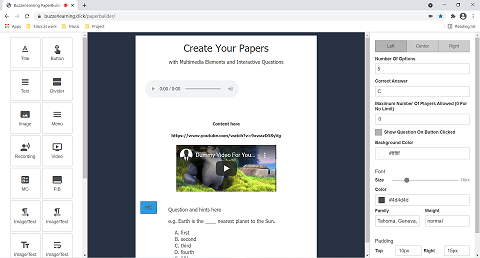
| Create your own content by dragging and dropping elements into the workspace. You can add text, images, videos, self-recorded audio, and Flipcards. You can export BuzzerMaterials in HTML format, add NetGroup support to facilitate your virtual lessons, or upload them to BuzzerExchange to enrich your online courses. |
 |
QuizBuilder
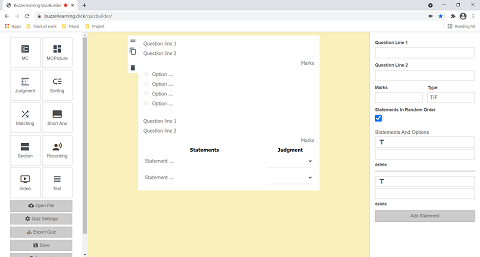
| Create you own quizzes by dragging and dropping elements into to the workspace. You can combine different types of questions such as Multiple Choice, Judgment, Sorting, Matching and Short Answer with Multimedia elements to suit your professional requirements. You can export BuzzerMaterials in HTML format, add NetQuiz support to facilitate your virtual lessons, or upload them to BuzzerExchange as online assessments. |
 |
NetGroup and NetQuiz
| NetGroup and NetQuiz are designed for virtual classes. They allow remote learners to participate in assessments. Teachers, as a host, can get real-time responses from students. To enable NetGroup/NetQuiz in BuzzerMaterials, select the corresponding checkbox inside 'Settings' of PaperBuilder or QuizBuilder. |
 |